The onboarding video, script and all
This page is the receipt for one video. Below is the whole thing: the document that went in, the nine scenes that came back, every word of the script, the frames it drew, and the sixteen pieces of lettering the engine invented that nobody asked for. Paste the script into a new job and you get this video, or something close enough to it that the differences are worth a paragraph of their own.
What went in
A twelve-page checklist, the one published at templates/onboarding-checklist. Not a script, not a storyboard, not anything written for video: an A4 document with an ownership grid, four stages of tasks, a blank ninety-day form and a worked example.
That is the normal case. Almost nobody sits down to write a video script. They have a procedure, a handbook or a checklist that somebody already wrote, and the question is whether that thing can become something a person will watch.
Twelve pages became nine scenes, and that is the interesting part
The document has roughly forty checklist rows. The video has nine scenes and ninety-one spoken words in total, about ten words a scene.
That ratio is not a limitation to work around, it is the point. A checklist is a reference: you open it at the row you need. A video is linear: the viewer cannot skip to their row, so putting forty rows on screen produces something nobody finishes. What survives the cut is the shape of the thing, four stages and the idea that every row has an owner, and the document stays where it was for the detail.
So the nine scenes are: the problem, the ownership rule, before day one, day one, the week-one question, the ninety-day statement, the thirty-sixty-ninety progression, the review, and a closing frame.
The script, in full
Each scene carries three things: what is read on screen, what is heard, and what is drawn. Timings come from the spoken lines, so they are not written by hand.
[caption] is the line a silent viewer reads. [voice] is written for the ear, ten to fifteen words. [drawing] is the frame: which objects, where they stand, how large, and any printed string word for word.
This is the script exactly as it stands in the job, including the parts that misfired:
[title] The Onboarding Checklist

[scene 1]
[caption] The Onboarding Checklist
[voice] Most onboarding checklists fail because nobody owns the rows.
[drawing] A rectangular table board occupies 65% of the screen in the centre of the frame. The board is divided by horizontal lines into rows. The left column displays task text: "Setup Email and SSO", "Assign First Task", "Set Probation Goals". The right column, headed "Owner", consists of empty rectangular cells with dashed outlines. Above these empty cells float three circular badges bearing question mark symbols. In the lower-left and lower-right corners of the frame, human silhouettes from the waist up stand with their backs turned, hands raised and open to the sides in a questioning gesture. The floor beneath the board is marked with a grid of intersecting coordinate lines.

[scene 2]
[caption] Every task needs one clear owner: HR, Manager, or IT.
[voice] Every task needs one clear owner: HR, Manager, or IT.
[drawing] In the centre of the frame sits a rectangular task board. Three solid connecting lines extend outward from its right column toward three human figures positioned around it in a triangle. In the upper-left corner, a woman in a collared blouse holds a stack of paper contracts and a handheld round ink stamp. On the right side, a woman with hair tied in a bun, wearing round eyeglasses and a tailored jacket, holds a digital tablet displaying a task text card. In the lower-left corner, a person in a hooded sweatshirt sits at a desk in front of an open laptop and a plastic identity card. In the right-hand column of the central board, the previously empty cells are covered by solid rectangular tags reading "HR", "MANAGER", and "IT".

[scene 3]
[caption] Half of good onboarding happens before the person even arrives.
[voice] Half of good onboarding happens before the person even arrives.
[drawing] The frame is divided down the centre by a vertical dashed partition line bearing a printed timestamp reading "09:00 AM". In the left half of the frame, a person in a hooded sweatshirt places a folded laptop into a cardboard carton and presses a rectangular sticker with a checkmark glyph onto the lid. Behind them at an adjacent desk, a woman wearing round eyeglasses and a tailored jacket writes with a pen on a vertical paper sheet titled "90-Day Statement". In the right half of the frame, across the dashed line, sits an empty workstation: a desk, an office chair on wheels, an active computer monitor displaying a username-password login box, and a wooden desk plate reading "Alex".

[scene 4]
[caption] Day one is for meeting people and shipping one small task.
[voice] Day one is for meeting people and shipping one small task.
[drawing] In the left third of the frame, a woman in a tailored jacket and a person in a button-down shirt stand in an open doorway, shaking hands with an arriving person who has short hair, a crewneck sweater, and an identity badge around the neck on a lanyard. In the right two-thirds of the frame, a person with short hair, a crewneck sweater, and an identity badge around the neck sits at a desk before an open laptop. Using both hands, this person lowers a solid geometric cube bearing an embossed microchip glyph on its top face into a square slot on a desktop docking station. A circular ring indicator surrounds the base of the slot, and the laptop screen displays a pop-up window reading "Task Completed".

[scene 5]
[caption] Ask what was confusing in week one before they stop noticing.
[voice] Ask what was confusing in week one before they stop noticing.
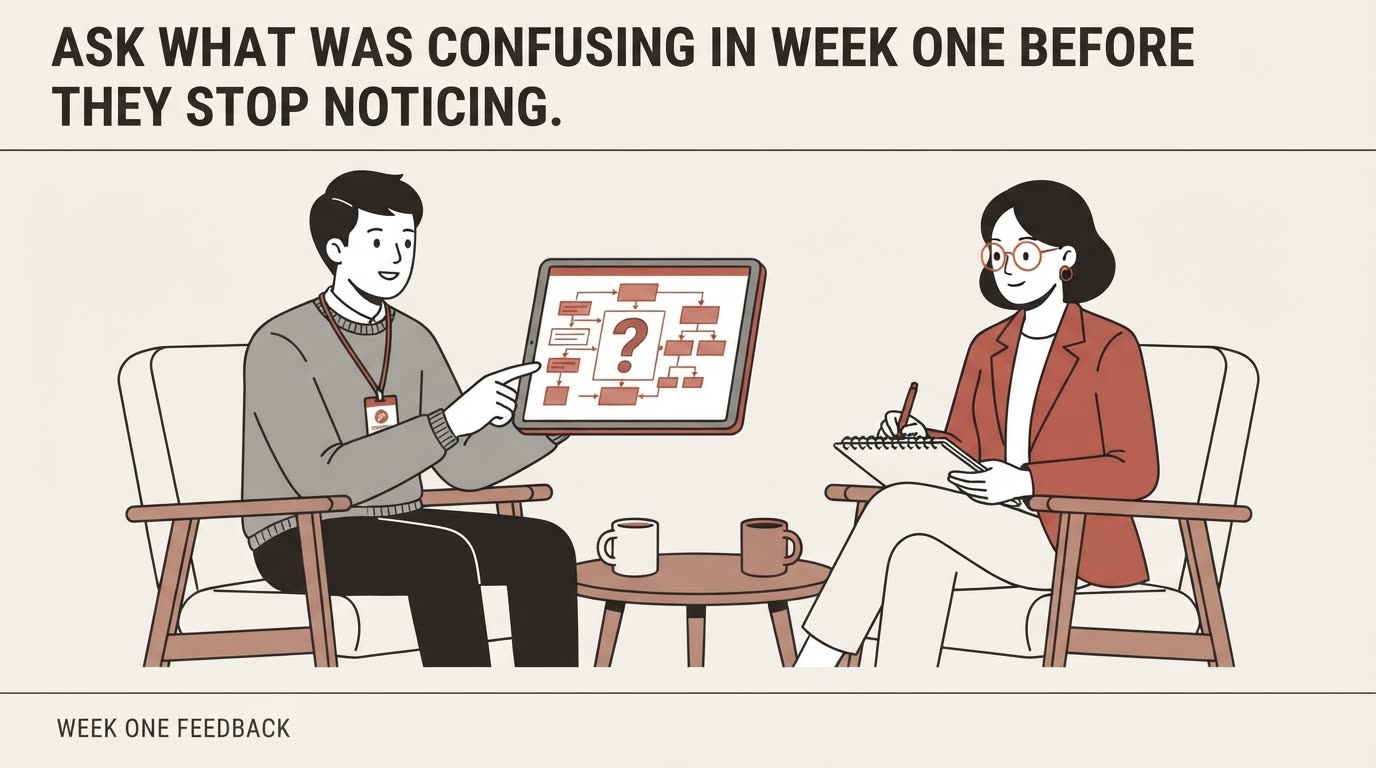
[drawing] Two people sit facing each other in armchairs on opposite sides of a low circular table. On the left sits a person with short hair, a crewneck sweater, and an identity badge around the neck on a lanyard, holding a digital tablet with both hands and pointing an index finger at a tangled flowchart with arrows and a central question mark on the screen. On the right sits a woman wearing round eyeglasses and a tailored jacket, holding an open spiral-bound paper notebook on her lap titled "Week One Feedback" and writing notes with the tip of a pen. On the low table between them rest two ceramic mugs with handles.

[scene 6]
[caption] Write the ninety-day statement before they start, defining real success.
[voice] Write the ninety-day statement before they start, defining real success.
[drawing] In the foreground on the left two-thirds of the frame, a vertical sheet of paper titled "90-Day Success Criteria" stands prominently. Three typed paragraphs run down the page beneath subheadings marked "Day 30", "Day 60", and "Day 90". A hand wearing a tailored jacket sleeve and a wristwatch holds a pen and draws a checkmark inside a square checkbox next to the third paragraph. In the background on the right, a person with short hair, a crewneck sweater, and an identity badge on a lanyard stands beside a wall-mounted dry-erase whiteboard covered in diagrams, holding a marker in a raised hand before three seated listeners whose backs face the viewer.

[scene 7]
[caption] Guide them from learning, to contributing, to owning work outright.
[voice] Guide them from learning, to contributing, to owning work outright.
[drawing] A solid structure of three ascending steps rises from bottom-left to top-right across the frame. On the first, lowest step labeled "Day 30: Learn", a person with an identity badge on a lanyard sits at a shared desk beside a colleague in a button-down shirt, both looking at a single computer monitor displaying a text document. On the second, middle step labeled "Day 60: Contribute", a person with an identity badge on a lanyard stands among a group of three colleagues, holding open a folder of documents before them. On the third, highest step labeled "Day 90: Own", a person with an identity badge on a lanyard stands alone behind a curved semicircular console desk fitted with workflow monitoring screens. At the base of the steps on the floor stands a woman in round eyeglasses and a tailored jacket with arms crossed over her chest, looking up toward the top step.

[scene 8]
[caption] At ninety days, review the process and rewrite the checklist.
[voice] At ninety days, review the process and rewrite the checklist.
[drawing] A rectangular wall board with grid rows stands in the centre of the frame. Facing the board with their backs turned toward the viewer stand a woman in round eyeglasses and a tailored jacket alongside a person with short hair, a crewneck sweater, and an identity badge on a lanyard. The person with the lanyard holds a stylus pen against the board surface and draws a straight horizontal line striking through a row of text reading "Old Tool". Directly beneath the crossed-out row, a new line of text appears: "Updated Role Template". A small rectangular plaque reading "Version 2.0" is mounted in the upper-right corner of the board.

[scene 9]
[caption] A great onboarding list turns uncertain arrivals into confident owners.
[voice] A great onboarding list turns uncertain arrivals into confident owners.
[drawing] In the centre of the frame, facing forward in full length, stands a person with short hair, wearing a crewneck sweater and an identity badge reading "Owner" on a neck lanyard. Resting flat on open palms at chest height, this person holds a geometric cube embossed with a microchip glyph. Spanning the entire width of the wall behind this figure is a large rectangular grid table board. In every row of the table, a task description appears on the left, a checkmark glyph sits in the middle, and a solid rectangular tag reading "HR", "MANAGER", or "IT" sits on the right.
The one rule that decides everything
Read the drawing lines again and notice what they do with people. The new hire is "a person with short hair, a crewneck sweater, and an identity badge around the neck on a lanyard" in scene four, and again in scene five, and again in seven, eight and nine. The HR manager is "a woman wearing round eyeglasses and a tailored jacket" every single time.
That repetition is not clumsy writing, it is the whole trick. Every frame is drawn on its own, from nothing but the words in that scene. An object described loosely is invented afresh each time, and invented differently, so the same person becomes three different people across a video. Write the description once, then copy that sentence into every scene the object appears in. Not a paraphrase. The same sentence.
What came back wrong
Sixteen strings of lettering appeared in the frames that were not in the script. The engine counts them itself, scene by scene, which is why this section can be exact rather than impressionistic:
| Scene | Invented lettering |
|---|---|
| 1 | YOUR FIRST WEEK |
| 2 | CONTRACT |
| 3 | Username |
| 4 | MODULE 03, YOUR FIRST WEEK |
| 5 | none |
| 6 | none |
| 7 | IT COMPLETE PAPERWORK, MEET YOUR TEAM & MANAGER, REVIEW INITIAL TRAINING MATERIALS |
| 8 | MODULE 03 |
| 9 | TASK 1 through TASK 7 |
The worst of them is the closing frame, and it is worth looking at, because the cause is visible in the script.
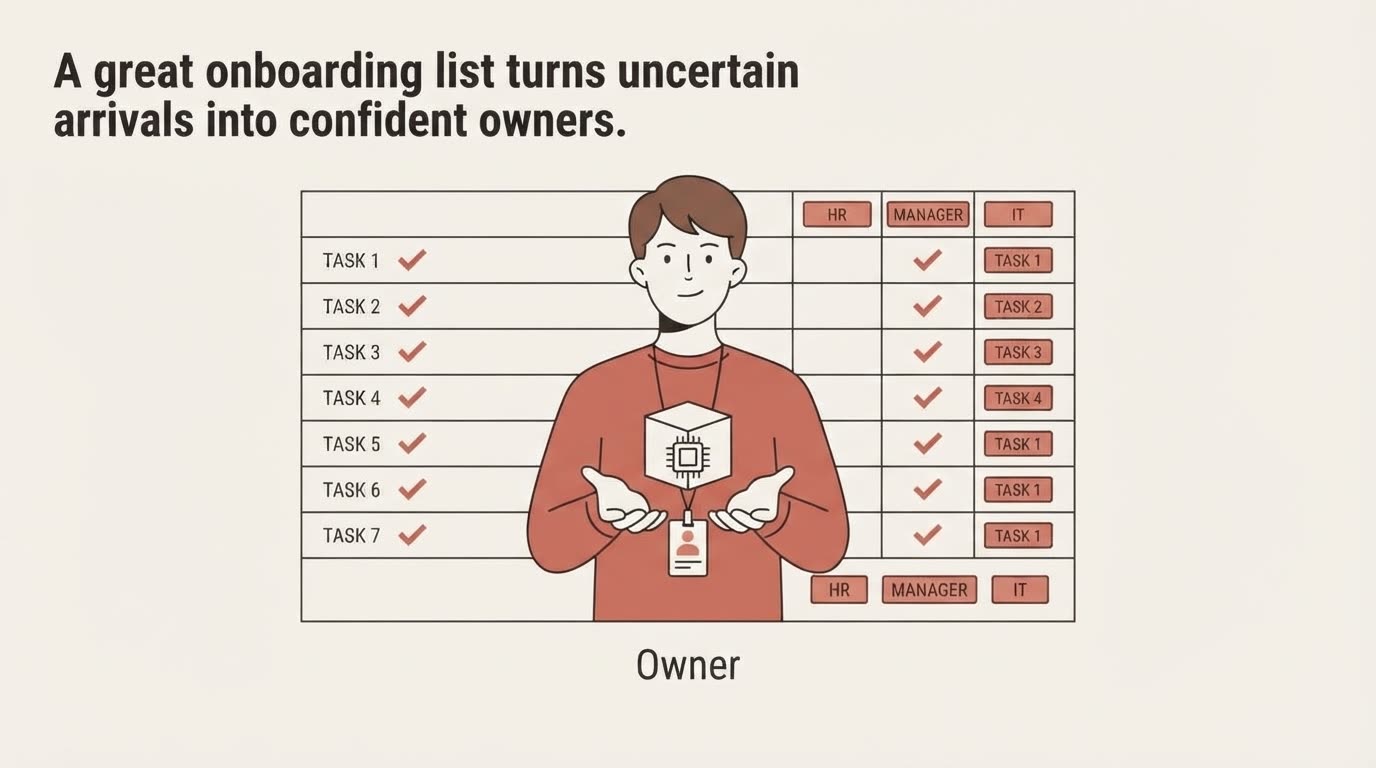
The drawing line for that scene says a table where "a task description appears on the left, a checkmark glyph sits in the middle, and a solid rectangular tag reading HR, MANAGER, or IT sits on the right". It never says what the task descriptions are. So the engine wrote its own, TASK 1 through TASK 7, and then lost its place in the right-hand column and repeated TASK 1 four times over.
Scene seven does the same thing more plausibly, inventing three real-sounding onboarding tasks, which is arguably worse: a wrong frame that looks right ships.
Two scenes came back clean, five and six, and they are the two whose drawing lines name every printed string in full: "Week One Feedback", "90-Day Success Criteria", "Day 30", "Day 60", "Day 90".
How it is fixed
Write the strings yourself, exactly, and end each frame with what is not in it.
For the closing frame that means naming all seven rows and their tags, spelling out that no other text appears in the table, and saying that the column headers appear once rather than at the top and bottom both. The rule generalises: anywhere the script describes a container without naming its contents, something will be put in it, and the something will be generated.
Nothing about this is specific to onboarding. The same failure appears in the receiving procedure video, where a notepad described as "a sheet of paper, seen straight on" came back as a spiral binder in one frame, a ringed pad in the next and a clipboard in the third.
Do it with your own document
The honest test is to paste in the document you already have rather than writing a clean one for the occasion. A procedure with awkward headings and inconsistent numbering is the realistic case, and it is the one that tells you whether this works for you.
The checklist itself, with the PDF, is at templates/onboarding-checklist. The method behind the script format is in how to turn a document into a video, and the frame-by-frame rules are in how to write a scene the engine draws exactly.